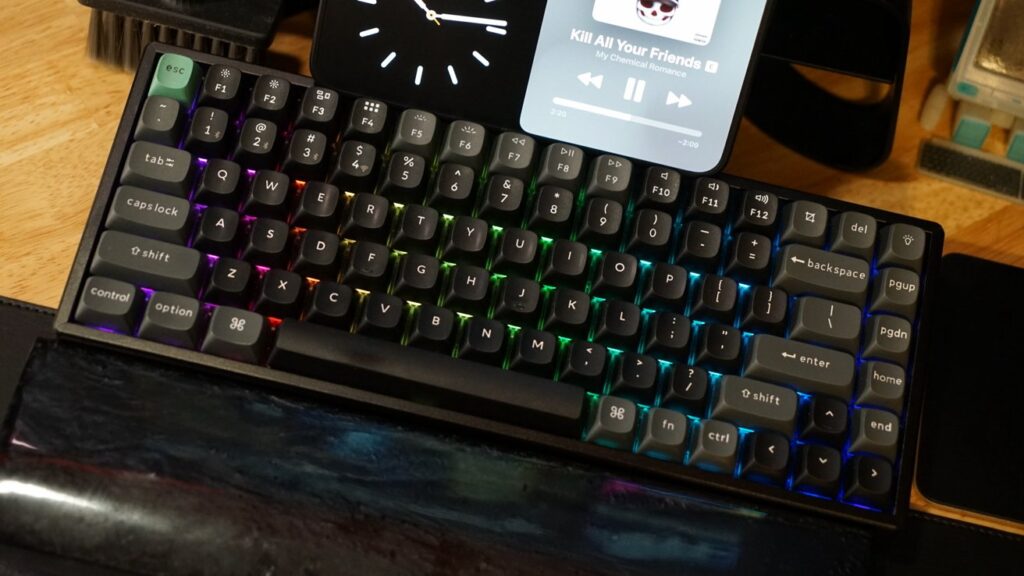
Keychron makes a lot of keyboards, but the latest Ultra 8K line is the peak of their offering, while the K2 maintains the premium specs and design at affordable prices.
I’ll be honest, I had to comb through the specs page to figure out exactly what was different about the Keychron K2 Ultra 8K compared to the Q1 Ultra 8K that I recently reviewed. That’s a compliment considering this keyboard costs half as much.
When shopping for Keychron keyboards, it’s best to understand what each part of the name represents. In this case, the K2 is a step down from the Q series thanks to the metal chassis versus all-metal body, plus a few other small differences.
The Ultra 8K moniker refers to the 8,000Hz polling rate, long battery life, and powerful MCU chipset. It’s a performance keyboard that can be customized from top to bottom.
If you’re looking for the best of Keychron, it’s an Ultra 8K model, although you can get it at a much more reasonable price with the K2 series. Let’s get into the details.
Keychron K2 Ultra 8K review: design
Keychron has a unique design that becomes difficult to differentiate without being an expert on the product lines. The K2 Ultra 8K is a 75% layout keyboard with red, brown, or banana Apex switches.
Keychron K2 Ultra 8K review: The K8 model has identical specs with a larger layout
I chose the Apex red switches and was able to test the K8 Ultra 8K as well, although it’s nearly identical aside from the few extra keys. Between the two I prefer the smaller layout which weighs less at 2.39 kilos.
The K-line lacks a volume knob, which is not ideal as it has proven to be a very useful option. Even so, the F keys still work for volume and the like on iPads and Macs.
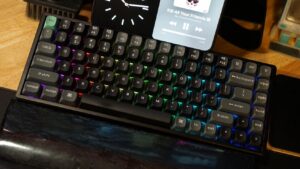
I’ve come to love the south-facing RGB backlighting, which can be fully customized with Keychron Launcher. Colors can be assigned to shine based on the key, but there are also numerous presets and built-in animations.
The keys themselves are rather boring. They come in this matte gray color scheme with a green Esc key, although they can be swapped out for keys of your choice.
Keychron K2 Ultra 8K review: Not the flashiest keycaps
I’d like to see Keychron try passthrough letter keycaps.
The design is nothing flashy other than the RGB backlighting. It’s pretty standard for Keychron and fits everywhere.
The red Apex switches I tested make a nice noise but aren’t loud. There’s also more than enough foam to keep reverberation down.
Keychron K2 Ultra 8K review: Two layers of feet for height adjustment
Feedback is also nice as each key presses and returns easily. I never feel fatigue when typing with these switches and they remain my favorite.
As with any mechanical keyboard, there are many layers here:
- Double snap PBT keycaps
- CNC machined aluminum frame
- Apex red, brown or banana switches; hot swappable
- Steel plate
- EVA foam
- IXPE foam and PET film
- PCB
- EPDM foam
- Bottom case PET film
- Bottom silicone pad
- ABS bottom
The low price and weight comes down to the construction materials compared to other keyboards. Keychron’s Q1 line, for example, has an all-metal body.
Keychron K2 Ultra 8K review: features
One of the most interesting aspects of Keycrhon’s coverage over the years is the incredible increase in battery life. The K2 Ultra 8K has up to 760 hours of use without backlight.
Keychron K2 Ultra 8K review: hours of battery life
My current desktop setup keeps cables to a minimum, so my keyboard is wireless. I’ll put a dock and cables in here eventually, but that day isn’t today.
The Keychron K2 Ultra 8K lasts days of work before needing to be recharged. Having K2 and K8 to test has been helpful, as I simply replace them as needed (it’s silly, don’t do it).
Some of these advanced specs are a little lost on me, but they’re great if you need them. The 8,000Hz polling rate means you’ll never encounter timing issues while gaming.
Keychron K2 Ultra 8K review: Up to five device connections simultaneously
Connect to your Mac, iPad or PC via a 2.4GHz dongle, Bluetooth 5.2 or wired connection. Using the side switch and three Bluetooth radios, you can easily switch between five devices without unpairing or re-pairing a device.
My setup is complex, as I can easily use or test multiple products at the same time. The Keychron K2 Ultra 8K allows me to easily switch between the 2.4 GHz connection to my Mac and the Bluetooth connections to my Apple Vision Pro and iPad.
All these features are powered by the Keychron MCU with 1MB flash. Connect to a Mac or PC and visit the Keychron Launcher to customize every keypress and even every RGB LED.
Keychron K2 Ultra 8K review: Keychron Launcher is only available on Chromium desktop browsers
Make sure you visit your customization software and turn on the 8KHz setting. All Keychron 8K keyboards come with 1KHz enabled by default to ensure the widest compatibility.
If I have any complaints about how the Keychron system works, it’s that I can’t do any customizations on the iPad. I would love to see Keychron Launcher work via an iPad app as I’m sure it will never work in Safari.
Using Keychron K2 Ultra 8K
I’ve enjoyed using the Keychron K2 Ultra 8K for the past few weeks, although I’m ready to go back to metals and high-quality knobs. The K2 series was the first mechanical keyboard I ever reviewed and I still find it to be a perfect starting point for this hobby.
Keychron K2 Ultra 8K review: a pleasant and not too noisy typing experience
Keychron keyboards are incredibly consistent, and after years of using different models, I’ve never encountered anything more than an occasional bug. Lately, I’ve noticed that keyboards are sometimes slow to wake up from sleep mode, which can usually be resolved by turning on the power switch or plugging in a cable.
Other than this hiccup, I have no problems.
My desk setup looks great with a large mechanical keyboard in the center. The feet in the back allow me to raise the back enough to ensure I have a comfortable typing angle as well.
Convenient without compromise
As I said at the beginning, I had to take a look at the spec list to make sure I understood exactly why the K2 was half the price of the Q1. It’s about building materials and changing options, but still.
Keychron K2 Ultra 8K review: K2 or K8, any model from the Ultra 8K range works well
At this price, the K2 Ultra 8K is a great option and undoubtedly a better option than Apple’s Magic Keyboard. Sure, it’s huge and heavy in comparison, but I’m not talking about that from a portability perspective.
There’s really not much else I can say that hasn’t already been said in many previous Keychron reviews. These are some solid keyboards and I’ll be the first to let you know if that ever changes.
If you want something a little lighter and more affordable, I can easily recommend the Keychron K2 Ultra 8K.
Keychron K2 Ultra 8K Review – Pro
- Half the price and lighter than the premium Q1 model
- South-facing RGBs are bright and incredibly customizable
- Hot-swappable switches, custom software and a good typing experience
- Connect up to 5 devices simultaneously
- Up to 760 hours of battery
Keychron K2 Ultra 8K Review – Cons
- No knob options
- Lack of pre-configured color options
- It would be nice if Keychron Launcher worked on iPad
Rated 4 out of 5
Having to give a numerical score I can only say that Keychron continues to create almost perfect keyboards. They are expensive and perhaps a little excessive for some, but they are great products.
Where to buy Keychron K2 Ultra 8K
Get the Keychron K2 Ultra 8K Mechanical Keyboard from the Keychron website or Amazon for $119.99. It’s only available fully assembled in black, though you can choose between red, brown, or banana Apex Switch.