After months of living with various SwitchBot products, namely the Lock Vision Pro and the garage door opener, I finally gave up and ripped out all SwitchBot products from my Apple home. Here’s why.
In July I wrote an article for “Owning an Apple Home” specifically about the broken promise of the subject. That story was directly inspired by my frustrating experience installing and using SwitchBot products in my Apple home.
Just four months later, I removed all SwitchBot products from Apple Home, unplugged them, and put them away. Things were rough in the beginning, but conditions have begun to worsen in recent weeks, and before anyone suggested it, before beta software or new Apple TV hardware was introduced.
Whatever the issue, as I noted in the Lock Vision Pro review, it appears that SwitchBot is at least indifferent to the quality of the experience using its products in Apple Home. I know this isn’t the case, but the levels of errors almost seem like intentional sabotage, because I have no idea how products like these could be shipped in these conditions.
Sure, the products themselves are solid, but only if you live in the SwitchBot app. I should have taken the company’s move towards chatbots and AI mascots as a warning, but SwitchBot is clearly not for me, at least not anymore.
The initial questions
When I agreed to review a smart lock from SwitchBot, I asked for a hub to make sure I could make everything work. The company sent me some of its cameras, an AI hub, the smart lock, and a separate hub device with a dial.
The devices in my home must work well with the Apple Home app
I then purchased a garage door opener from the company, assuming it would be good to stick to one set of products. They were Matter or Apple Home enabled except the cameras, so I figured everything would be fine with my Apple Home.
The AI Hub allowed me to install Home Assistant to manage the cameras and plug them into Apple Home. It also featured the ability to run OpenClaw for automation.
I was too sketchy of OpenClaw to do more than install it, look at the options, and then immediately delete it. The last thing I wanted was for my camera feeds to be analyzed by an external AI entity.
Apple Home had my trust in HomeKit Secure Video, SwitchBot did not.
Cameras added through Home Assistant would not show a live feed in Apple Home. At most, I might see a new image every few hours, but I’ve never been able to actually get them to stream except from the SwitchBot app.
I can trust Apple HomeKit Secure Video with AI analysis, not SwitchBot and OpenClaw
I installed the garage door opener, which was presumably Matter. I assumed this meant easy installation, but I was wrong.
Instead of appearing like a garage door, the device installed itself as a hub for SwitchBot devices, which then added a lock to Apple Home. Not a garage door, but a lock, padlock icon and all.
Locking and unlocking this “lock” would open and close the garage. I have no idea why the device didn’t simply show up as a garage door as expected.
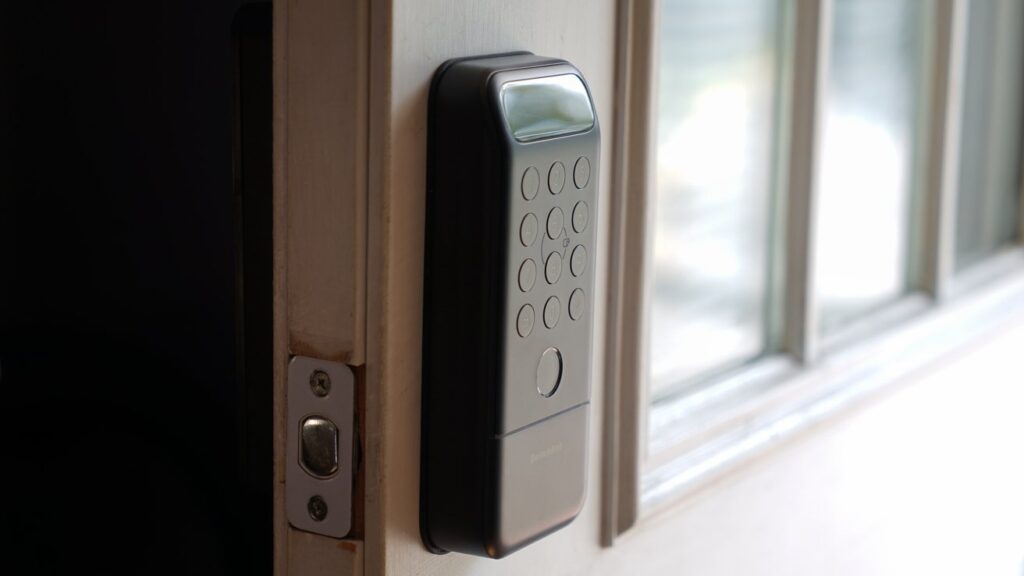
Then, once I installed Lock Vision Pro, I only then realized that the lock did not support Apple Home Key. It had many ways to check it, including palm vein recognition, face recognition, and fingerprint scanning.
It appeared in Apple Home, but only as an addressable sensorless lock. There was a door opening and closing sensor, but it was not present in Apple Home.
At this point I was frustrated but the products worked, more or less. They were strange oddities, but I hoped they would still fit my Apple Home.
The latest problems
Weeks pass and I slowly begin to detach the various SwitchBot products. I ditched the cameras almost immediately and unplugged the AI Hub.
This little hub could control my Sony TV. Clean.
The one-knob hub was almost useless except for bouncing IR signals off my Sony TV if I wanted. It was just hanging on the wall and looked strange given that Apple HomeView was revealed while this device existed in my house.
The garage door opener that looked like a lock and the lack of a house key confused and frustrated my wife Natalie, but she lived with the oddity without complaint. The garage door opened and closed and she was able to enter the house, so everything was fine.
Then, starting in October I continued to receive “door open” and “door closed” notifications from Lock Vision Pro. These notifications arrived in rapid succession and apparently had nothing to do with the actual status of the port.
No options for controlling these notifications have emerged in the SwitchBot app and the Apple Home app. As for Apple Home, despite the notifications, there was no door opening and closing sensor.
I ended up just turning off the notification on my iPhone. Then the notification started flooding my Apple TVs until I turned them off there.
Needless to say, this particular bug was infuriating. I assumed something strange was going on somewhere for this to happen and that it would be temporary.
Things just started to get buggy or just not work at all.
I looked for an update and tried to install it, but the installation tool still didn’t work, so I gave up.
Another problem in recent weeks has been the worsening of authentication. I would go to open the door and my fingerprint wouldn’t work, the palm reading feature would ignore me and end up using my face.
Sure, I could have pulled out my phone, opened the Apple Home app, and then tapped the lock, but these features should work. Plus, if it had the Apple Home Key, I could tap the door with the clock to open it.
The last straw
The new Apple TV 4K arrived and I set it up, only to see it immediately inundated with “door open” and “door closed” notifications. This reminded me to check for updates again.
Home key is not an option on SmartBot Lock Vision Pro
I finally got the update tool working and the lock was now updated after a half hour process. I had to leave the SwitchBot app open and my iPhone Duo perched near the lock for the update to install.
That night, without explanation, the SwitchBot Lock Vision Pro appeared in Apple Home as a “door open” door sensor. Tapping the icon will lock and unlock the lock without changing the icon.
Something was very broken.
An hour later, the problem resolved itself and the icon returned. However, my trust in this product has been shattered.
I don’t know what’s going on with SwitchBot, but I’m completely unhappy with its situation and how it integrates with Apple Home. I am even more frustrated by the knowledge that Nanoleaf, an amazing company whose products I appreciate, has been acquired by SwitchBot.
My colleague Andrew O’Hara reports that he has seen no problems with SwtichBot products in his setup. Your miles may vary.
Apple Home Collection should be the blueprint for any Apple-compatible accessory in the future
Whether or not it’s software bugs, my setup, or a broken hardware component, that’s not the point. My issue is the overall experience of the SwitchBot ecosystem since I installed the first product.
Everything seems not optimized for Apple Home, and the app seems increasingly focused on AI tools and integrations. SwitchBot clearly wants me in that app every day, not Apple’s.
So, here’s where I’m at as an Apple Home user. Apple’s new strategy centers on a vertically integrated experience that works seamlessly within the Home app and on Apple HomeView.
I will embrace this strategy as if it were my own. While not everything may be made by Apple or second-party like the Apple Home Collection, many smart home products come close.
SwitchBot products do the opposite.
I’m planning a story soon on third-party Apple Home products that fall on the line between third-party and second-party. I have a few device manufacturers on that list and can’t wait to find more.
In any case, I made my decision for the short term. If a smart home device can’t be easily set up and managed by Apple Home, I don’t care.