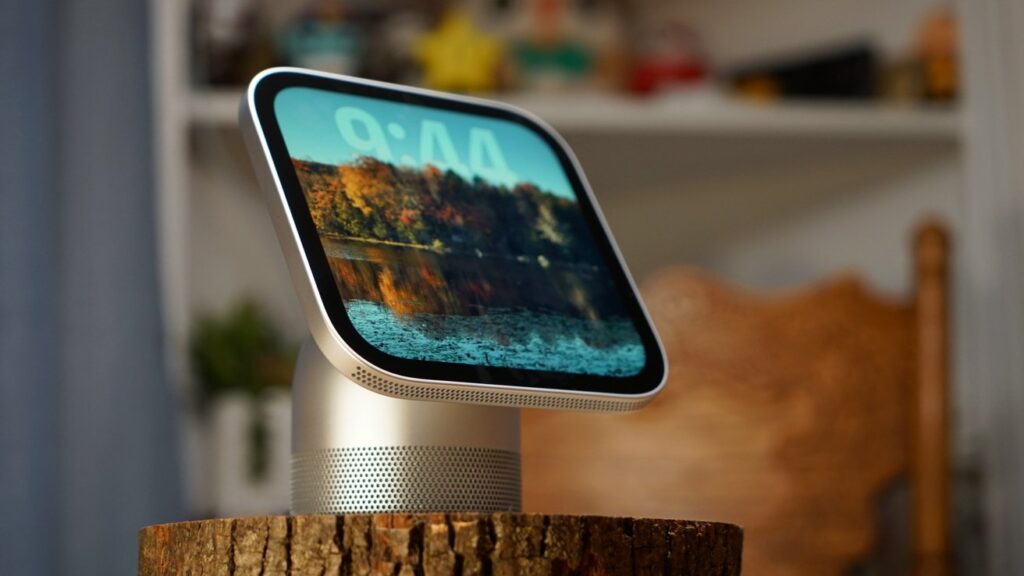
Apple didn’t create any strange proprietary connectors or power systems for Apple HomeView, but instead relied on USB-C. That little connector opens up a lot of possibilities, including battery packs.
Many of the early rumors about Apple HomeView made it sound like a portable display. At one point it was even suggested that they would be carried around by multiple users in a home rather than being fixed in place.
The product Apple announced was the opposite in almost every way. It’s billed as a stationary speaker like the HomePod, but with a display or controller that would replace a light switch or smart display.
At first I wondered if that decision was bad and if Apple HomeView should be portable. While it can absolutely run on battery power, I’ve abandoned the original assumption that it had to be totally portable.
The point is this: Apple HomeView is not an iPad, and Apple knows it. Making the device portable would break into the narrow and deliberate user space that Apple has created for the product.
That said, there’s still room for a battery in this little display.
The need for a battery base
After spending a week with Apple HomeView, I can easily say that it is a stationary device. This constraint forces you to interact with it in the way Apple intended, which I appreciate.
A small battery can easily power Apple HomeView
However, there’s at least one place in my house where a portable HomeView would make the most sense: the kitchen.
Currently the Apple HomeView is placed on the counter located behind the sink. It’s a corner section with a raised shelf, so the display is easily visible from anywhere in the room.
However, it is a small display, which limits its usefulness beyond being a nice viewer of photos or album covers from a distance. I like that Apple considered the user interface to be easy to view from a distance.
By the way, that’s another thing the rumors got wrong about. The UI was said to adapt based on the user’s distance, which was never announced and did not ship.
Apple HomeView is actually pretty static when you’re not interacting with it
Anyway, when testing the HomeView on a battery, I realized that having the ability to carry the display from behind the sink to the kitchen island is a good option. This is where a simple drum stand would be amazing.
I’ve seen some projects made in the 3D printer community that house a shelf for a standard battery, but they’re bulky. I assume it’s only a matter of time before we see a custom made drum base made by some third party.
Apple HomeView doesn’t need much to power it. The basic speaker model requires 30W while the wall mount option requires 20W.
My little MagSafe iPhone battery with power cord was able to run HomeView without issue. Having such a small battery to move HomeView while you cook is more than enough.
A simpler solution
Apple HomeView is such a computationally simple platform that it launches almost immediately when plugged into power. Even if a battery is too bulky or ugly, the alternative is simpler.
Remove the USB-C cable and move HomeView where you need it
I can see myself or my wife taking the HomeView from the sink by unplugging the USB-C cable on the back and moving it to the island. There, connect a USB-C connected to an outlet or battery.
It takes approximately 15 seconds for full startup and normal operation. Sure, losing power in those moments is inconvenient, but it doesn’t make the device unusable.
Outside of this use case, I’m not sure what utility a portable HomeView would provide. We already have iPhones, iPads, Apple Watches and Macs that can move with us.
HomePod mini has some basic battery options, so expect HomeView to have some as well
By making Apple HomeView a device that must be connected to power, you create constraints and limitations. It’s not a tablet to carry around the house, yet another device to charge or the App Store to populate.
Instead, Apple HomeView is a secondary device experience with AirPlay, decent speakers, and an interface that relies on donated apps and widgets. If it were more, it would be a different and potentially confusing product.
I plan to test various battery packs, cases, and other products with Apple HomeView in the future. However, I really think Apple could have hit the size and OS limitations in the first iteration to ensure it was the product it says it is.
Sometimes constraints are a good thing.