Professional color grading software can make or break the look of a video, and Adobe Premiere gives everyone from beginners to seasoned professionals the tools to achieve cinematic results.
Capturing the video you need for a project is only half the battle. Sometimes the footage you capture matches your creative vision with minimal editing, but when it’s not quite right, color grading can help you do the rest.
While some entry-level video editing tools rely heavily on basic filters, professional color grading software offers more control over color, contrast, exposure, and tonal adjustments.
Adobe Premiere has an extensive suite of built-in color correction tools, with much of the work done using the dedicated color mode. Support for third-party plug-ins offers even greater creative flexibility.
Get Adobe Premiere
You don’t need years of video editing experience to get started with Adobe Premiere. At the same time, its color grading tools offer enough depth to satisfy demanding professional workflows.
Color management and color modes
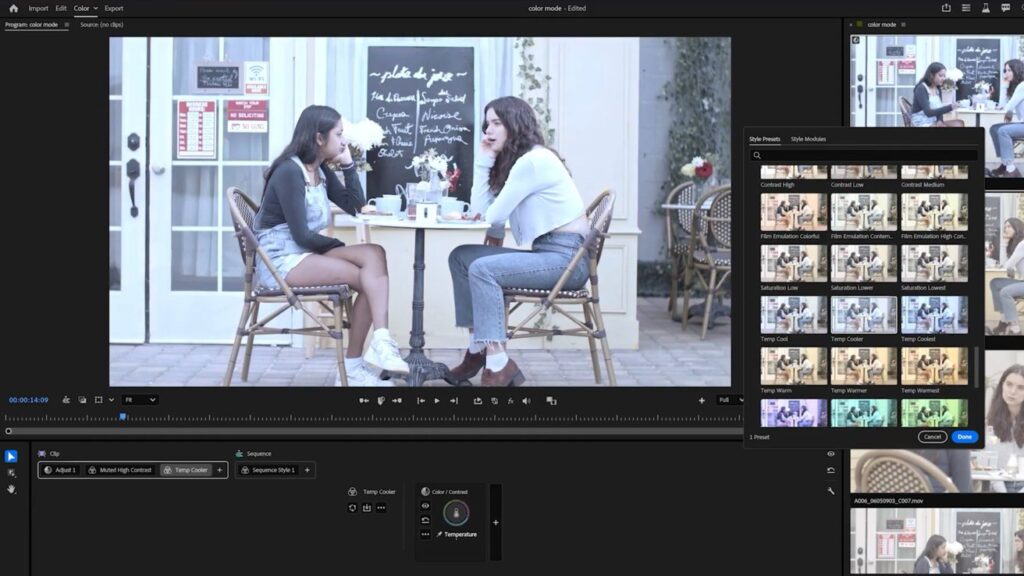
Recording video in RAW or using a registry color profile can give you more flexibility during post-production. Adobe Premiere’s built-in color management system simplifies the process, while the color mode provides the tools you need to optimize your shots.
Color correction can turn a normal shot into a cinematic sequence. Adobe Premiere gives you precise control over color, contrast and exposure, helping you preserve detail and achieve the aesthetic you want.
If you’ve ever wondered exactly how a Western gets its sepia tone or how your favorite sci-fi movie gets those cold corridors, it’s thanks to color grading. The great thing is that Adobe Premiere gives you all the artistic control you want through direct manipulation or presets.
You can also import your own presets to create a specific look. Built-in tools like Auto Color can automatically adjust exposure and white balance, giving you a starting point for further creative refinements without sacrificing artistic control.
The best video color grading software provides the tools you need while staying out of the way. Adobe Premiere’s color mode supports HDR color grading workflows, while the clip grid makes it easy to compare shots, identify inconsistencies, and navigate to clips that need further adjustments.
Sometimes you just need to get in and out before posting your video to social media. Adobe Premiere offers quick export options and simple editing tools.
Even simple adjustments can improve your video
Easily adjust color temperature, exposure, saturation and more, just like when editing a photo. Make changes to individual clips or an entire sequence.
Adobe Premiere also offers Styles, which combine multiple color adjustments to help you quickly achieve a consistent look in your footage.
The built-in style browser is packed with presets that can help you achieve the color grading effect you want.
If you’ve got the perfect look in one clip, Adobe Premiere lets you easily copy that color gradation and apply it to another, helping maintain visual consistency throughout your project.
Adobe Premiere offers much more than just color grading. Its inclusion in your Adobe Creative Cloud Pro subscription gives you access to a full video editing platform alongside other creative apps, including Photoshop and After Effects.
While free online color grading tools may be sufficient for basic adjustments, some have limited export settings and color management capabilities. Professional software like Adobe Premiere gives you more control over both the look and output quality of your footage.
Adobe’s Creative Cloud Pro subscription, which includes Premiere and more than 20 creative apps, normally costs $69.99 per month. During Adobe’s Black Friday sale, the price drops to $29.99 per month for the first year, reflecting a 57% discount.
Eligible students and teachers can save even more, with the first-year price of $15.99 per month. Both promotional rates require an annual subscription billed monthly, with offers ending November 27.
With Adobe’s Black Friday discount, now is a great time to invest in professional video editing and color grading software. Get Adobe Premiere via Creative Cloud Pro.