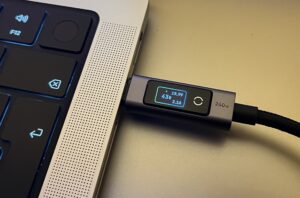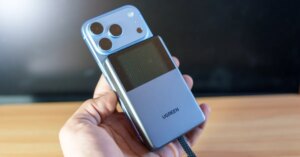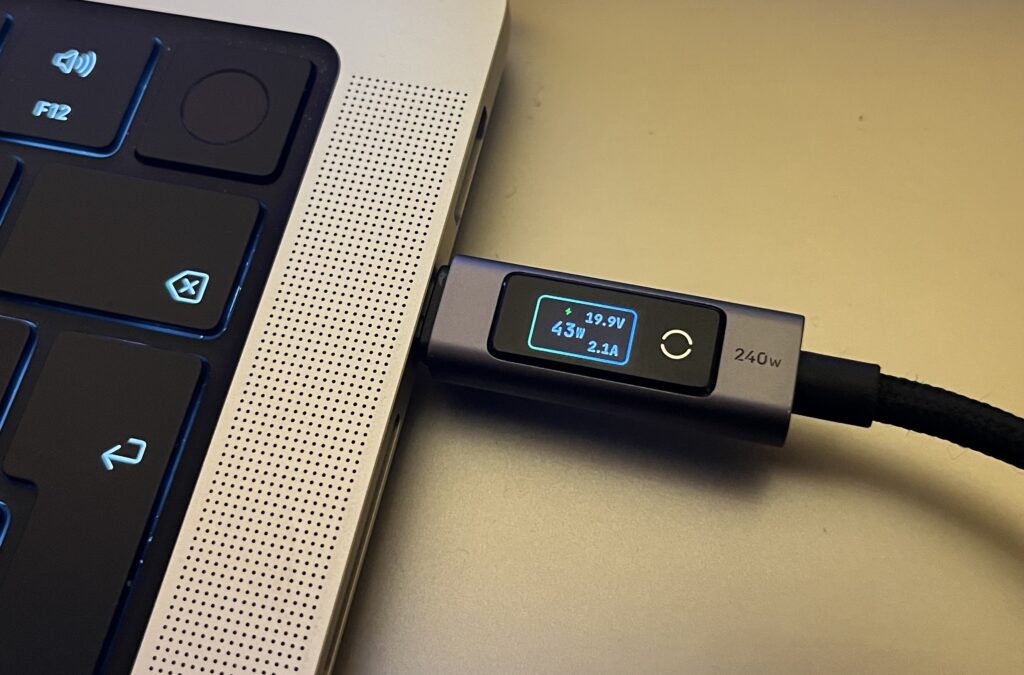
While browsing Amazon recently, we came across a USB-C cable from a well-known manufacturer with a built-in display. To be more specific, Ugreen offers this accessory in 3.3-foot and 6.6-foot versions with US list prices of $23 and $27, respectively. Both cables are currently discounted on Amazon. However, it is quite expensive for a cable, but the display caught our attention because it shows current, voltage and power. It is also integrated directly into the connector rather than a separate in-line module.
We ordered one to try. Nothing particularly stood out during unboxing. It has the familiar braided fabric sheath, which usually makes it easier to untangle tangled cables. The connectors are well made and the strain relief seems decent too, although we’d probably have to use it for a year before judging its durability.
Like most manufacturers, Ugreen ignores USB-IF certification. The cable therefore also lacks the required labeling that identifies its capabilities. At least one side says “240w”, suggesting support for up to 48V and 5A.
The display is slightly larger than those typically found on other cables, but the connector is still a reasonable size. Carrying the cable around is not a problem. The larger screen has space to show all three readings needed to evaluate the charging connection. Has the correct tension been negotiated? Has the current successfully increased from 3A to 5A? Both are immediately obvious, and you don’t need to multiply voltage by current to calculate power.
A small touch-sensitive area controls the display. A long press turns it off, while a tap toggles between landscape and portrait orientation. This is useful for smartphones, which usually have the charging port at the bottom. However, some laptop and tablet users may not be completely satisfied with this cable. In landscape mode, the display is only oriented correctly when connected to the right side of a device. It works on our M5 MacBook Pro, but our M1 MacBook Pro and Fujitsu Lifebook U729 have charging ports on the left only.
Display precision
Compared to our AZZHy C3 USB power meter, the readings were reasonably close to moderate power levels. Both showed 43 W. The Ugreen connector showed 2.1 A, while the C3 showed 2.2 A. Things get more complicated at low power levels. From what we observed, the display only varies between 0.0W, 0.5W, and 1.0W in that range. With an actual consumption of 0.3W, the Ugreen connector often shows 0.0W. This limits its usefulness when charging small devices if accurate readings are important.
Incidentally, the C3 is not rated for voltages above 26V. Interestingly, we still managed to charge a power bank at 140W, which means 28V. Unfortunately, we don’t have any devices that operate above 28V, so we can’t cover that range in this brief look at the cable. It should also be emphasized that even the C3, which is generally considered quite accurate, cannot replace professional measuring instruments when high precision is required.
Overall, though, we like the cable. It provides a quick overview of charging conditions beyond just power consumption. We find the display orientation slightly awkward for laptops, as it is designed around a charging port on the right. Of the five laptops with USB-C in our collection, only one has a suitable port on that side. Sure, most of our laptops are older models, and reading the display upside down or in portrait mode becomes familiar after a while.
I have been involved in IT for over 20 years, first as a system administrator (Mac and PC; 2000-2014) and then as a journalist (from 2005 onwards). I have attended numerous industry events, such as IDF, Displayweek, Computex, CES and IFA, to cover topics such as mobile and local area networks, Bluetooth standards and developments in the mobile industry. Since 2017 I have also worked as an aviation journalist, which means traveling around the world reporting on both planes and trains.